Play It By Year Music Player
com.martyhammel.playitbyyear
View detailed information for Play It By Year Music Player — ratings, download counts, screenshots, pricing and developer details. See integrated SDKs and related technical data.
- No items.

Screenshots

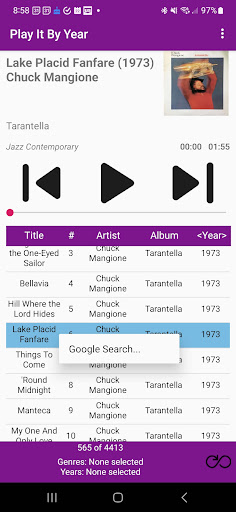


Description
NO ADS! NO IN APP PURCHASES! This app is listed as having ads and/or in app purchases but it doesn't currently have either of those.
DESCRIPTION
Play It By Year is a music player for music stored on your phone. It focuses on playing music by years and genres. Both year and genre filters can be applied together. Sorting can be done on title, artist, album, and year. Note: Play It By Year cannot be used for streaming music from a music service or other source.
GREAT FOR TABLET MOUNTED IN CAR
See screenshots for how Play It By Year looks on a tablet (that could be mounted in a car, truck, or RV), in both portrait and landscape modes!
FEATURES
- Displays album art
- View release years for all songs
- View track numbers
- User-friendly landscape layout especially useful for tablets.
- Sort by any column (title, artist, album, year).
- Mix year and genre filters any way you want.
- View a list of your played songs history and play from that list.
- Change the size of the list for your music. This allows you to fit more on your screen or enlarge parts of the screen for easier reading, for instance, in the car.
- Tap on the title of the song to bring up the volume control.
- Tap on the text at the bottom that shows the current genres and years filters to bring up the filter options. The filters can mixed any way you want. Bring up the filter options through the menu also.
- Long click a song for more options like doing a Google search on the song or removing a song(s) from the history list.
- Play any current list (including filtered lists) randomly using the random button.
- Seek to any position in a song using the seek bar.
- Fast forward and fast rewind by tapping and holding the skip next and skip previous buttons.