Mine Finder
com.lakinpark.minesweeper
View detailed information for Mine Finder — ratings, download counts, screenshots, pricing and developer details. See integrated SDKs and related technical data.

Screenshots


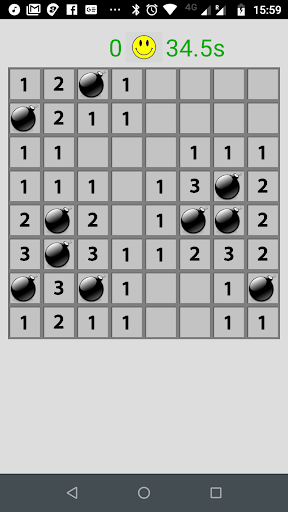

Description
Yes, yet another Minesweeper-type game (yawn!), but it is free with no-ads, so don't complain too much!
For anyone who doesn't know what Minesweeper is, it's a simple logic game where you try to uncover all tiles in a grid that do NOT contain a mine, and you try to do this as quick as possible.
Instructions ...
- select the grid size and number of mines you want to play - the larger the grid, and the larger the number of mines, then the more difficult it is
- during play you can zoom in and out of the grid by using pinch-zoom, and scroll around if the grid is larger than the screen.
- perform a short press on a tile to uncover it (by default - see notes below)
- if you uncover a time that contains a mine then you lose
- if you uncover a tile that doesn't contain a mine, then it may contain a number indicating how many mines are adjacent to that tile
- if a tile has no adjacent mines then it will be empty, and all of its adjacent tiles will be uncovered automatically
- if you think you know where a mine is located, you can flag that tile by performing a long-press on it - remove a flag by performing another long-press on it (by default - see notes below)
- once all tiles that do not contain mines have been uncovered then you win
- the fastest winning time for each grid size and number of mines is stored so you can try and beat your fastest time
- when a game ends, select the smiley face at the top of the screen to try again, or the back key to go back to the main menu
Have fun!
Notes ...
- the mine positions are randomly generated before the first click - not after - which is done on purpose as it's annoying when you hit a mine with your first click, isn't it (hehehe).
- you can now configure the controls for uncovering tiles, for toggling the flag on a possible mine, and toggling the zoom. If you don't like the long-press for flagging mines, then you can now change it!