Clipboard / Canned text List
com.kame33.apps.phraselist
View detailed information for Clipboard / Canned text List — ratings, download counts, screenshots, pricing and developer details. See integrated SDKs and related technical data.
- No items.

Screenshots
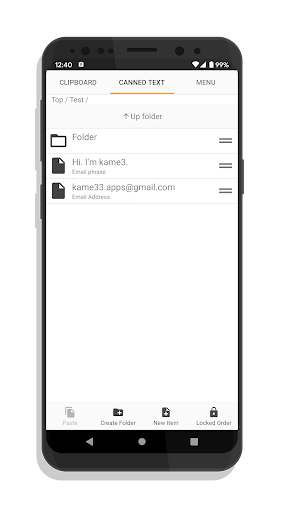


Description
Non-resident (does not start the service does not consume memory), Android 10 compatible clipboard support / fixed phrase list (copy and paste) app.
[Clipboard support]
By tapping the button (non-display setting possible) in the notification area, you can manually register the character string on the clipboard to the list. It is not registered automatically, but it is also available on Android 10.
- Tap the button or shortcut in the notification area to get the clipboard string and register it in the list.
- Create a shortcut on the home screen or register it in various launchers before use.
[Common phrase list]
Since it is non-resident, it can also be used as a simple fixed phrase list application that registers and manages frequently used texts or email addresses, etc.
- You can register any fixed phrase from the "New regulation phrase" at the bottom of the screen.
- Tap the list line to copy the registered fixed phrase
- Press and hold a list line to delete, edit, cut (move), copy (duplicate) (paste is done with the lower left button)
- You can sort the list with the knob at the right end of the list line by setting the "sort mode" with the lower right button.
[Others]
- Mushroom is also supported
- Supports backup function
- By changing the settings, you can close the application at the same time as copying.
- From the menu, you can open settings, remove ads, and app information (contact information, etc.)
* The data stored in this application is not encrypted. We do not recommend using it for password management.
In addition, the developer is not responsible for any troubles that occur using this application.