愚痴フリー〜不平不満をブチまけてストレス発散!〜
com.jpn.bestyle.guchi
View detailed information for 愚痴フリー〜不平不満をブチまけてストレス発散!〜 — ratings, download counts, screenshots, pricing and developer details. See integrated SDKs and related technical data.
- No items.

Screenshots

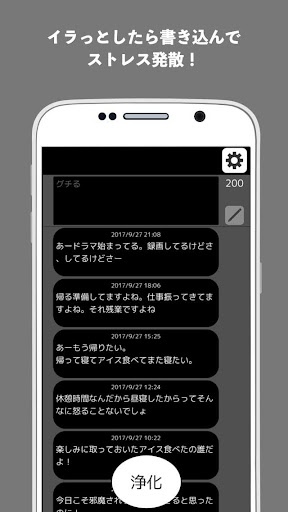


Description
"Complaining Free" is an application that refreshes your feelings by writing down the complaints that you have accumulated on a daily basis and purifying them all at once.
To you who can't tell anyone and don't want to leave it anywhere, but want to complain.
Why don't you release your stress by complaining as much as you like?
■■■ Caution ① ■■■
It has been reported that when the blue light reduction app is installed, it does not respond to touch on the screen.
It seems that the cause is that "Blue Light Filter" is enabled, so please try disabling the Blue Light Filter.
If that doesn't work, try uninstalling the Blue Light Mitigation App.
■■■ Caution ② ■■■
If you deleted the app because you forgot your password, but the lock screen still starts even after you re-install the app, please try the following steps.
(1) Open the Android settings screen (press the center button at the bottom of the smartphone screen and select "Settings", or swipe the home button at the bottom of the screen to the top of the screen to display the application list. Find and press)
(2) Select "Apps and notifications (or app list)" to display the app list.
* Depending on the Android version, you may need to select "App information" next.
(3) Select "Complaining Free" or "Guchi" from the application list.
(4) Select the item "Storage" or "Storage and cache".
(5) There are "Clear data (storage)" and "Clear cache" buttons, so press both.
(6) When you start complaints Free, it will start in the initial state (the setting has been reset) (it is not locked).
■■■■■■■■■■■■
■ Function
① complaints line
・ Stress is released by complaining earnestly!
② Purification function
・ Eliminate complaints and refresh your mind!
③ Lock function
・ No worries about being seen by others!
・ If you fail to unlock 3 times, the complaint will disappear!