ParaScheduler MDT
com.jackstep.driver
View detailed information for ParaScheduler MDT — ratings, download counts, screenshots, pricing and developer details. See integrated SDKs and related technical data.
- No items.

Screenshots


Description
ParaScheduler MDT is the communication platform to communicate trip status information to the server application.
Settings: Used to establish communication between the host server and the device. This is used to verify and register the device to the main application on the host server. A device not registered cannot communicate with the server.
Login: Used to verify the user is authorized to utilize the device registered to communicate with the main application.
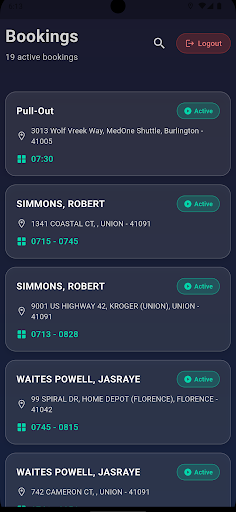
Once the above two conditions are met, the device will share geo-location information with the main application based on the frequency received from the main application and the main booking screen will populate the run information applicable to the registered device and user.
Main Booking Screen: Used to communicate sequential activities to the device to Include:
Route information: start (Pull-Out), end (Pull-In), lunches and/or breaks.
Trip location information for pick-up and destination.
Screen components: Clicking on a booking record loads the associated details to the device for the activity selected (P, L, B, +, - or I).
Basic functionality of each screen includes:
Address: clicking will load the location information to the device’s navigation/map application for directions to the location.
Phone (if enabled) will send the information to the device’s internal phone dialer.
Button visibility and functionality are based on the activity of the selected record, and will submit location and time to the main server. All records contain:
Arrive – visible to all initial activities, indicating the arrival or start of the activity.
Perform – visible only after arriving, indicating the departure of the location or end of the activity.
Additional button visibility and functions based on activity include:
For (+) bookings indicating pickup information after arriving:
Cancel – Indicates the passenger cancels the trip and will not be riding.
No-Show – Indicates the passenger did not meet the vehicle and will not be traveling (visible after a designated time provided by the server application has elapsed)
Signature (if enabled) allows the passenger or representative to provide a signature authorizing the trip.
For (-) bookings indicating drop-off information after arriving:
Signature (if enabled) allows the passenger or representative to provide a signature authorizing the trip.