Castro - system info
com.itemstudio.castro
View detailed information for Castro - system info — ratings, download counts, screenshots, pricing and developer details. See integrated SDKs and related technical data.

Screenshots



Description
Castro is a huge collection of information about your device and a set of tools for monitoring its status. This allows you to check the performance of your device in real-time!
Large collection of the information
Castro processes and displays a huge amount of information, namely:
• Detailed processor statistics (CPU and GPU);
• Battery monitoring;
• Consumption of all kinds of memory;
• Data usage via Wi-Fi and mobile networks;
• Real-time sensors data with useful graphs;
• Detailed information about device\'s cameras;
• Full list of available audio and video codecs;
• Monitoring temperatures of the device;
• And many other features, including DRM and Bluetooth!
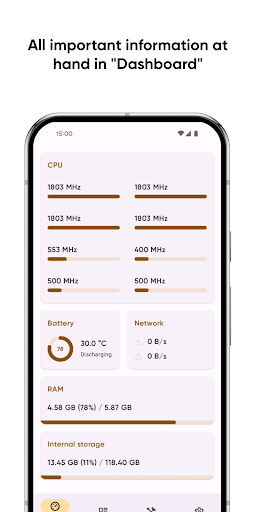
The most important thing in the \"Dashboard\"
If you are not interested in too detailed information in a larger volume, you can always use the \"Dashboard\" window, which collects all the most important information - CPU usage, battery status, network usage, and memory load on the device.
More control with useful tools
• Share your device information using \"Data export\";
• Test your display state via \"Screen tester\";
• Check the noise around you with \"Noise checker\".
Even more features with the \"Premium\"
\"Premium\" users will have access to even more features, such as:
• Deep interface customization with various colors and themes;
• Battery monitoring tool to track battery properties;
• Configurable home-screen widget, with information about battery, memory, and more;
• Network traffic speed monitor to track your connection speed;
• CPU usage monitor to keep abreast of frequency usage;
• PDF format for information exporting.
FAQ and localization
Looking for answers to frequently asked questions (FAQ)? Visit this page: https://pavlorekun.dev/castro/faq/
Want to help in Castro localization? Visit this page: https://crowdin.com/project/castro