티맵PlusHUD
com.infratek.hud
View detailed information for 티맵PlusHUD — ratings, download counts, screenshots, pricing and developer details. See integrated SDKs and related technical data.

Screenshots


Description
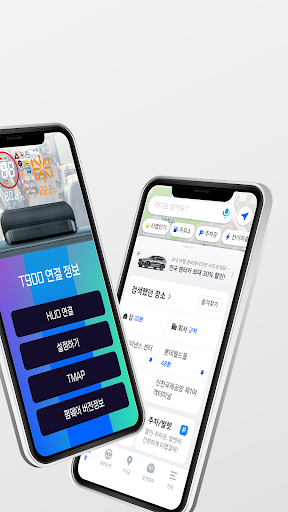
Do you only turn on TMAP when driving? Now turn on T-map PlusHUD, the eternal partner of T-map.
TMAP's navigation, which is responsible for all daily movements, speeding/section/traffic weak/parking enforcement guidance and distance, route guidance, driving direction and remaining distance guidance, current/arrival time guidance, traffic information collection, , access road/guideway guidance, etc. Keep an eye on the front while receiving the same guidance from all T-map navigations
▷ Route guidance/search function
- Provides a more perfect route with TMAP navigation technology and long-term know-how
- We collect and analyze the driving data of 19 million users in real time and guide you to the best route.
▷ Information on speeding signals / section enforcement cameras
- While driving, the location of the speeding signal, remaining distance, and current speed displayed on the TMAP screen are displayed on the T-Map Plus HUD terminal as well.
- In the case of a TMAP warning sound and red screen caused by exceeding the speed limit, the red light flashes on the Tmap Plus HUD terminal to notify the user of the speeding condition.
▷ Information on protection zones for the transportation vulnerable
- The location and remaining distance of the protection zone for the transportation vulnerable are informed on TMAP, and the LED on the protection zone is turned on on the T-Map Plus HUD terminal, and the speed and remaining distance are displayed.
- If there is a camera in the protection area for the disabled, guidance is provided in the same way as when speeding at a traffic light.
▷ Tunnel/overpass/underpass entry and guide line guidance
- When guiding an access road to improve the driver's convenience and safety in using the road in TMAP, the corresponding LED is immediately turned on in the T-Map Plus HUD terminal, and the speed and remaining distance are displayed.
▷ TMAP x NUGU Voice Assistant
- Use various TMAP functions conveniently with voice commands such as “Find Incheon International Airport”, “Let’s go home”, and “Tell me the toll fee”.
▷ High brightness LED / AUTO illuminance sensor
- High-brightness LED is used for clear brightness even during the day
- The light sensor is automatically activated to prevent glare in dark places such as underpasses and parking lots.
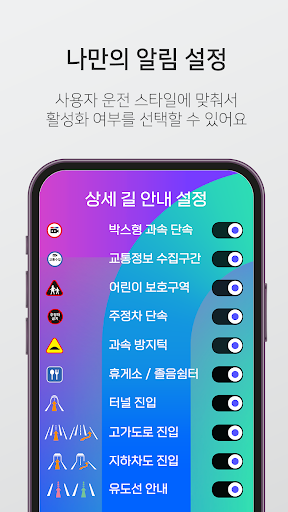
▷ Application activation/deactivation setting / sound, brightness control
- You can set the desired notification according to the user
[ caution ]
▷ The T Map Plus HUD app works normally only when linked with the T Map Plus HUD terminal.
▷ As a T-map Plus HUD communication-based app, it cannot be used when Wi-Fi or Data communication is impossible
[Access Rights]
▷ T-Map Plus HUD uses the following access rights.
- Location (required): display current location, route guidance