TonTraining
com.froschprog.tontraining
View detailed information for TonTraining — ratings, download counts, screenshots, pricing and developer details. See integrated SDKs and related technical data.
- No items.

Screenshots


Description
Did you know that you burn more calories when you cycle slowly 5 days a week to work (5 km one way) than when you swim 1500 m twice a week?
This app allows you to keep track of your training or activities. All data are saved locally. No information is sent to any server. No publicity/advertisement at all.
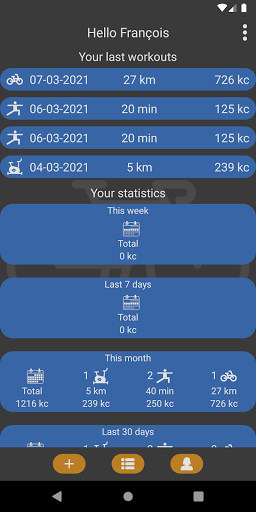
You should start by entering your name, height and weight. After that you can enter your workouts (button "+"). For each new workout you should first choose the type of workout/activity: Running/Walking, Exercise bike, Gym, Bike, Swimming, Other. After that you can enter the details which depend on the type of workout. The app calculates the number of kilocalories (kcal) you spent. This estimation is based on the data you entered, you weight and your height.
- Running/Walking: you can use this workout for hicking, jogging and so on. Take care to enter the distance and the possible elevation gain. This can be done by clicking on the icons.
- Exercise bike: you should enter either the power (Watts) or the number of kilojoules (kj) displayed on your bike. If your bike does not give this information, youll have to estimate the power (As an indication: 15 km/h corresponds to approximately 70 Watts on a usual city bike. 30 km/h on the same bike corresponds to 250 Watts).
- Gym: there you choose the level of workout by yourself. This defines the number of calories per minutes. Relax corresponds to stretching. Low: low intensity workout. Medium: muscles training with short breaks between the exercises. Cardio: cardio training without or with very short breaks. Extreme: very intense cardio training.
- Bike: the app considers that your start and finish points are the same. This means as much uphill as downhill. Calories are calculated using the distance, the average speed and the climbs.
- Swimming: hier, it's mainly the distance which determines the calories. The style (crawl, breast…) does not play a big role (for leisure trainings).
- Other: just choose the most appropriate intensity value corresponding to your activity and enter the duration.
If you click on a weekly, monthly, yearly statistic in the main screen you reach the weekly, monthly or yearly statistics page, where you can compare your achievements of the last weeks, months or years in a graphic representation.
The setting page allows you to choose the language of the app and to export or import workouts to/from a text file. This allows you to transfer you data to an other phone. You can access the file in the folder of the app in the internal memory of your phone.The file is deleted if you uninstall the app, unless it was copied before to another location.