Pix Alarm - Photo Clock Timer
com.fansfolio.alarm
View detailed information for Pix Alarm - Photo Clock Timer — ratings, download counts, screenshots, pricing and developer details. See integrated SDKs and related technical data.

Screenshots



Description
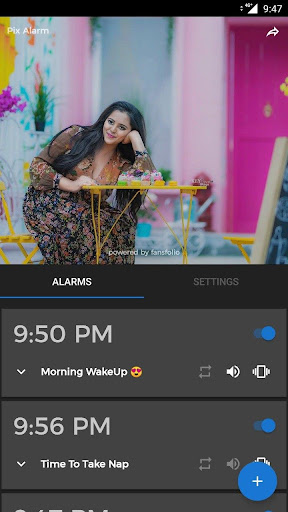
Pix Alarm is an alarm clock that displays a chosen picture when it goes off. In addition to the typical alarm settings, it allows you to select a picture from the device's gallery and add it to the alarm. It's our way of saying thank you for everything.
Important Tips or Useful Info
- Don't delete photos/pictures in the file manager or gallery that one added for alarm.
TODO or On Plate
- In the current version repeat or snooze options are reliable, we are working on it for a better experience. By default, it will show the default photo/picture chosen for the pix alarm.
- This app has not yet been tested in all the types of brand or version mobiles
- Please write or contact the technical team if found any major bug or issue related to the alarm.
- The current version can choose only alarm tones which available in-app.
Highlights
- Manage different Photos for alarms according to your needs.
- Set a timer with the default background image.
- Themes are here: Dark and Night
- Select your favourite photo to wake up.
- Select your favourite tone to wake up.
- Select your preferred way to the alarm, choosing between touching, button and/or Swipe.
- Forget the screens that rotate when you're waking up.
- Preview the selected pictures in alarms after setting up.
Do not hesitate, to use Pix Alarm and start your day with your favourite photo.
------------------------------------------------------
Have Feedback us?
For any questions, feedback or just a query, write to us at contact@myinnos.in