All Video Downloader
com.examplehash.VideoDownloader
View detailed information for All Video Downloader — ratings, download counts, screenshots, pricing and developer details. See integrated SDKs and related technical data.
- No items.

Screenshots


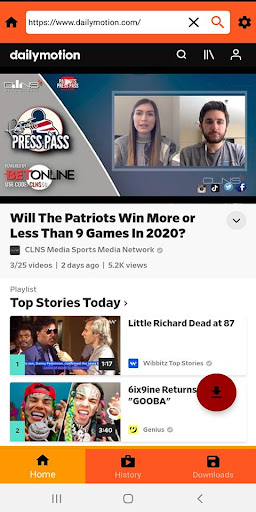

Description
All video downloader allows you to download videos and social media clips from social webs and popular video sites onto your device by one click.
This Video Downloader utility detects, downloads and save shared videos directly from internet to your android device.
This video downloader does not support YouTube due to their terms of service.
App capabilities:
----------------
- Search or enter url in address bar to start browsing videos.
- Play videos directly from the application.
- You can directly browse for your favorite social media sites by icons.
- Automatically detects video links from browser after playing video.
- Preview video before downloading.
- Full feature download manager with pause/resume/remove and connection lost handling capabilities.
- Awesome download manager and smart video detection feature.
- Single tap downloads, play the video and press the download icon that pops up on the screen.
- Download all videos in background.
- Super fast downloading.
- Resume failed downloads
- Live download progress bar for each running download.
- Notifies when the download is started or completed.
- Support for large files download.
- Support all video formats such as MPK, AVI, MP4, MKV, FLV, WMV, MPG.
- View your favorite videos in Landscape or portrait mode.
- Support for HD Video download
- Fastest video downloader from all available video downloaders.
All Video downloader auto detects videos, you can download them with just one click. The powerful download manager allows you to pause and resume downloads, download in the background and download several files at the same time. Preview the video first, fast download and play it offline.
All video downloader for social media to fast download all videos from websites online. Download all videos from social accounts with this all video downloader for social media.
Video Download Steps:
--------------------
- Go to your site by icon or using URL pasting on search bar.
- Play video in app's in-built web browser.
- Wait for the download icon to pop up at bottom right of the screen.
- click the button to download video.