Calculadora Factura IGV Perú
com.diordi.calculadoraigvfacturaper
View detailed information for Calculadora Factura IGV Perú — ratings, download counts, screenshots, pricing and developer details. See integrated SDKs and related technical data.

Screenshots

Description
IMPORTANT DISCLAIMER
This app is NOT official and does NOT represent any Peruvian government entity. It is an independent tool developed by Diordi Apps for the sole purpose of serving as a personal utility to assist users with calculating the General Sales Tax (IGV) on their invoices.
INFORMATION SOURCE
The calculations are based on the 18% General Sales Tax (IGV) rate in force in Peru. This information is in the public domain and can be verified on the official website of the National Superintendency of Customs and Tax Administration (SUNAT): https://www.gob.pe/sunat/.
The app does not connect to any government service to obtain this value in real time, and the user should be aware of possible future changes to this rate.
APPLICATION DESCRIPTION:
Calculator for completing invoices in Peru.
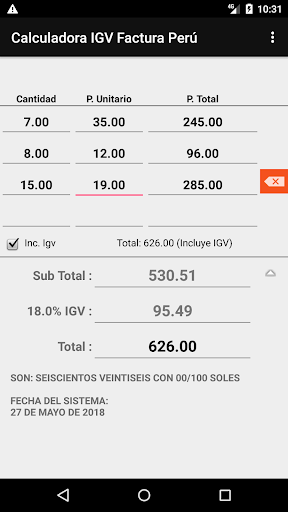
Detailed Mode (Invoice):
- Enter the quantity of units and the unit price.
- Instantly view the total price of the item.
- Sum of all added items.
- Calculate the Subtotal without VAT.
- Calculate the VAT Amount.
- Display the Total including VAT.
- Total written in words to facilitate completing the invoice.
- System date.
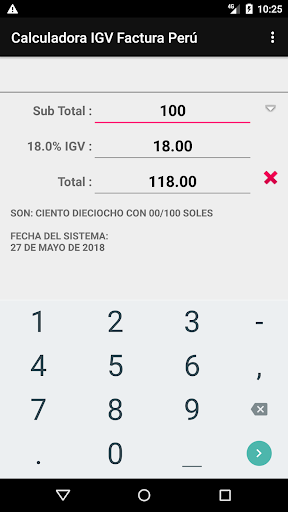
Quick Mode (VAT Calculator):
- Enter a single value: base amount, VAT, or the total amount.
- The following will be displayed instantly:
- BASE AMOUNT, in numbers with two decimal places.
- VAT, in numbers with two decimal places.
- TOTAL AMOUNT, in numbers with two decimal places.
- Total written in words.
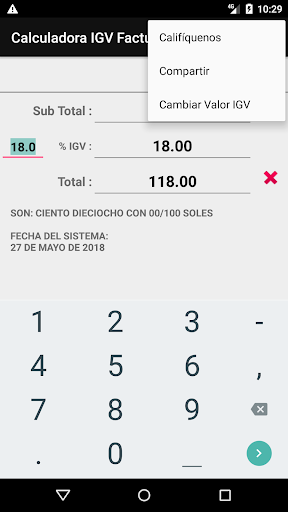
The VAT percentage value can be changed manually.