TeethBank
com.culminare.teethbank.android
View detailed information for TeethBank — ratings, download counts, screenshots, pricing and developer details. See integrated SDKs and related technical data.
- No items.

Screenshots


Description
TeethBank allows anyone in the dentistry field to list their products or services. The app offers features like:
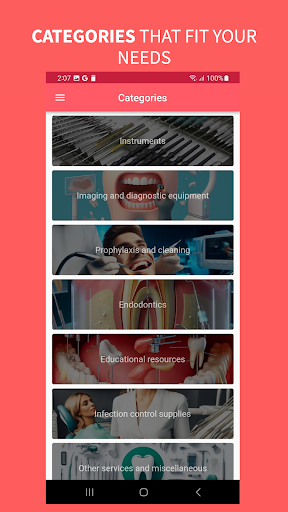
1. Categories
Category Picker
Select specific dental categories for listings.
Dental Services
Dental Equipment
Dental Supplies
Dental Products
Dental Education
2. Listing of various dentistry-related products and services.
Photo Gallery
Showcase dental products, services, and clinics with photos.
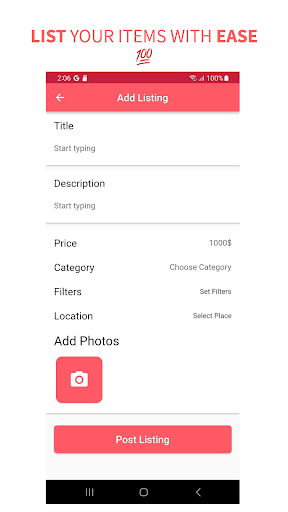
Title, Location (Map), Description
Title: Name of the product, or service.
Location (Map): Display the location of dental clinics or suppliers on a map.
Description: Provide detailed information about the product, service, or clinic.
Advanced Filters (Extra Info)
3. Filter options
Generic Custom Filters
Users can filter dental listings based on the available options.
Filtering by Category
Filtering Listings
4. Contact Seller
Users can engage in a conversation with the seller
5. Ratings and Reviews
Allow users to view and leave ratings and reviews for dental services and products.
6.Add To Favorites
Let users save their favorite dental products, services.
7. Universal Map View
View all dental listings on a map.
8. Chat
Real-time Chat between Patients and Clinics or Buyers and Sellers.
Contact Seller: Connect users with dental product sellers or clinic representatives.
All Conversations List: List all ongoing dental-related conversations.
Real-time Push Notifications: Notify users of new messages.
Text Messages, Photo Messages, Video Messages, Audio Recorded Messages: Enable rich media communication.
User Blocking & Reporting: Ensure user safety and comply with guidelines.
9. Add New Listing
Sellers can list dental products, or services.
10. Multi-Photo Uploading
Sellers can upload multiple photos of their dental products.
Camera Integration
Capture photos directly for listing creation.
Photo Library Integration
Choose photos from the device's library.
11. My Listings
Sellers can manage and edit their dental listings.
Remove Listing
Allow sellers to remove outdated listings.
12. Search
Enable users to search for dental products, services, or clinics.
13. Dark Mode Support
The app automatically switches to dark mode based on the phone settings for a comfortable viewing experience.
14. Profile
My Listings: Manage user listings.
Saved Listings: Access favorite dental listings.
Account Details: View and update user account information.
Edit Profile Picture: Customize user profiles.
Settings: Adjust app preferences.
Contact Us: Provide a way for users to contact support or get assistance.