LEXiby PRO: Automation for car
com.cubesugar2014.lexi_pro
View detailed information for LEXiby PRO: Automation for car — ratings, download counts, screenshots, pricing and developer details. See integrated SDKs and related technical data.
- No items.

Screenshots


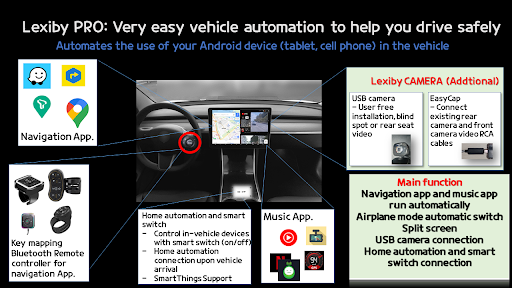

Description
LEXiby PRO: Very easy tasker for vehicle
-Support automatic launch Generative AI (copilot, chatgpt)
-Support prevent losting accessibility permission(with adb) for all-in-one
-Support off the phone screen while driving for android-auto
-Support USB Camera, Smart switch feature
-Support Rocket mode for carlinkit, android all-in-one z9109, m300s 7862, obdpeak k50, t30, BMW tb8768 NAVIGUIDE 14.9
-Split screen
-Support language: English, Korean, Japanese, Spanish, French, Taiwanese
-Easy to automatic launch navigation App. and turn on WIFI Hotspot with Airplane mode
-Connect with Slack & Telegram bot
-For Tesla Vehicle's WIFI as wifi router. If your Tesla Premium Connectivity has expired, you can use mobile phone to connect to the internet using a hotspot.
-And automatic shutting down for battery protection in summer and winter. and it save the earth as reuse phone device
More Information, Visit our homepage (http://www.lexiby.com)
- A helpful blogs for first-time users (good to follow)
1. How to use your android tablet in the vehicle
https://blog.naver.com/jstarmin/223471708353 (2024.6)
- What is the Lexiby PRO ?
With very easy and simple setup will automatically launch the navigator App(Waze, Sygic, google map ,baidu map, copilot, chatgpt etc) with selected music App.
When you start it up and shut it down when it stops starting like Automateit or Tasker (general-purpose automation apps)
You can also enter airplane mode or setting daily route, etc.
- Run Home Automation
As soon as you arrived home, you can run home automation in advance to notify your family of your arrival, turn on the lights, adjust the heating, and more. Before use, you must enter the automation name created by Samsung Smartthings
- Devices currently in use
1. samsung , LG: mostly
2. LENOVO: TB-J606F TB-J606L TB128FU TB-J607Z TB128FU
3. Alldocube: iPlay_50 iPlay_40 iPlay_20 T803 T811 iPlay50 Pro Tab_Ultra iPlay 50 mini
4. Xiaomi: Redmi 5 Plus M2101K6G Redmi Note 9S Mi Pad 4 POCOPHONE F1
5. Teclast: P10_HD_ROW P80X_EEA P80 Pro M40(N9H3) T20(T2E1) 40_EEA
6. incar: T10M T40 Pro_EEA U10PRO T40PRO_L1, Npad Air(N-one)
7. etc: ZTE K88, K92, M2C-200, Tab P11 Pro, EC30_900E, E-dong HL106 Blackview Tab 11, headwolf fpad5, k50, k50Q, t30
- Usecases
1. Execute when connected to Bluetooth
2. Execute when both Bluetooth connection and power connection are satisfied
3. Run only by connecting power (mode for permanent installation as a navi-only phone)
** In the case of online navigation apps such as Sygic, since the Internet is essential when driving a vehicle, there is a way to open and use only a SIM without additional cost due to data sharing of the carrier, etc. There is a way to use it by connecting to a wifi hotspot.
4. Airplane mode on/off (beta function, mainly on Samsung Galaxy phones)
** it helps to switch to airplane mode to reduce battery consumption when driving infrequently.
◈ Our App. uses the Accessibility Services API (AccessibilityServices API) and complies with Google's policies, so it may not work depending on device or situation.
○ Every time you use the Navi app (driving), you have no choice but to change the settings of your mobile phone and repeatedly close the app. To improve user convenience by automatically doing this, some functions use accessibility API this is absolutely necessary.
○ Accessibility permission is required to use the following functions among all the functions of our app. If you don't want to use it, you can exclude.
- Close the launched App.
- Turn on and off functions such as airplane mode, Wi-Fi, mobile data, and hotspot
- Initial setting of the launched app
- Power off for battery protection
○ Our App. is using android.permission.BIND_ACCESSIBILITY_SERVICE.
○ Our App. do not collect or share personal or sensitive user data.
** Navi App:Sygic, Here, Waze, T-map, kakao-navi, navermap, g-maps go , カーナビ , carnav, baidu map, offline navi etc.