Practice a motion in a camera
com.comself.capvideo
View detailed information for Practice a motion in a camera — ratings, download counts, screenshots, pricing and developer details. See integrated SDKs and related technical data.
Screenshots

Description
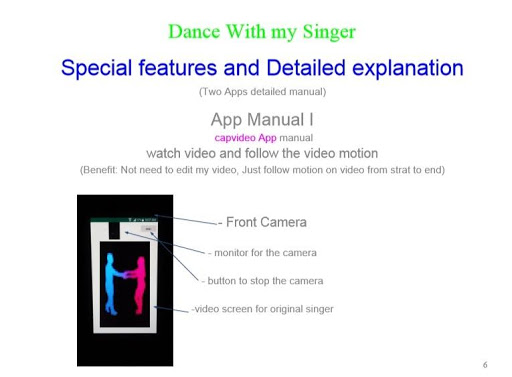
Dance with Singer!!! retrieve your favorite singer video. Just watch an original singer dance on the screen of the phone then follow them with the same tempo and motion. camvideo will take your motion on the same duration. No need to edit your video duration. Just dance before the phone. That's it!!!
**** To enjoy the best fun tools!!!! ****
Please, go to the Google play, then click "Apps" in the menu. type "comself" at search.
To be better work, when you install
"a3Dmovie":
To compare videos, please install "Camera with video from web" or "Practice a motion in a camera".
"Camera with video from web":
To monitor this app, please install "Compare my video and one from web" or "a3Dmovie apps".
Capmovie:
To watch videos, please install "Camera with video from web" or "Practice a motion in a camera".
"Practice a motion in a camera":
To take videos, please install "Camera with video from web" or "Practice a motion in a camera".
"Compare my video and one from web":
To compare videos, please install "Camera with video from web" or "Practice a motion in a camera".
Again Please, go to the Google play, then click Apps in the menu. type comself at search.
*************
This app works above Android 5.0 on portrait mode!!!
Need permission to use camera, video, storage media when installing first launching!!!
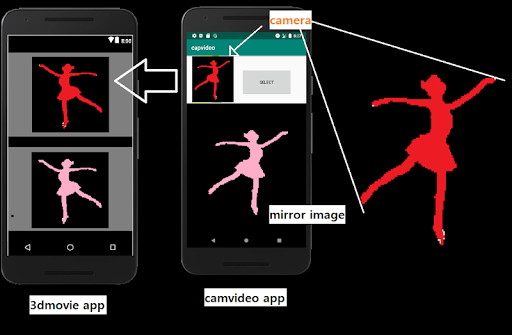
To monitor your dance motion video, open a3dmovie app.
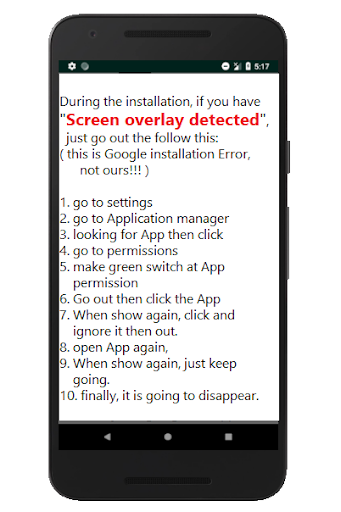
---->>>> when the initial installation, "Screen overlay detected".
( this is Google installation Error, not ours!!! )
-> go to settings -> Application manager -> permissions -> green switch -> When show again, just keep going.