comdirect photoTAN App
com.comdirect.phototan
View detailed information for comdirect photoTAN App — ratings, download counts, screenshots, pricing and developer details. See integrated SDKs and related technical data.

Screenshots



Description
With the free photoTAN app you can approve online banking transactions safely and quickly.
This is how the photoTAN process works via the computer:
You make a transaction on another device; e.g. B. a PC.
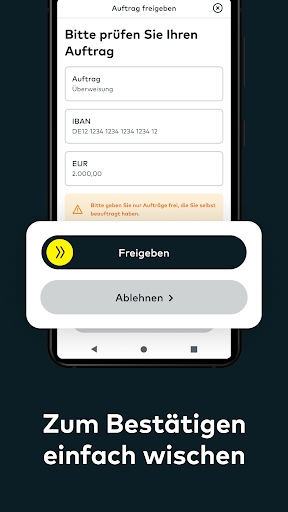
Your transaction will be automatically transferred to the comdirect photoTAN app and a notification will appear on your smartphone. When you tap on the message, the photoTAN app opens. Check the transaction and release the TAN by sliding the arrow from left to right.
The usual scanning function of the comdirect photoTAN app is retained. This is recommended, for example, if your smartphone is not connected to the Internet. To do this, select the photoTAN procedure “photoTAN graphic” on your computer and then open the scan function at the bottom left of the comdirect photoTAN app on your smartphone.
This is how the App2App process works:
You carry out a transaction in another comdirect app. The photoTAN app opens automatically during the approval process for your transaction. Confirm your order by sliding the arrow from left to right.
The following comdirect apps support the App2App process:
- comdirect app
- comdirect trading app
-comdirect Young
How to activate the photoTAN app before using it for the first time:
Log in to the comdirect personal area with your access number and PIN and follow the instructions “Activate photoTAN” until the activation graphic is displayed. Download the comdirect photoTAN app onto your smartphone and follow the instructions in the app. Once the app is activated, you can use the two methods mentioned above.
FAQ “What permissions does the app use?”
The “Camera” authorization is required in the standard procedure for scanning the photoTAN graphic.
FAQ “Does the app work with multiple comdirect accounts”?
You can connect the app to up to 8 accounts. You need a separate activation letter for each account.
Further information about photoTAN can be found at www.comdirect.de/photoTAN
If you have any questions or suggestions about photoTAN, we are happy to help you around the clock:
By email to info@comdirect.de
or by phone:
Customers: + 49 (0) 41 06 - 708 25 00
Interested parties: + 49 (0) 41 06 - 708 25 38