BERLIN mobile POS
com.claritysuccess.berlin
View detailed information for BERLIN mobile POS — ratings, download counts, screenshots, pricing and developer details. See integrated SDKs and related technical data.
- No items.

Screenshots



Description
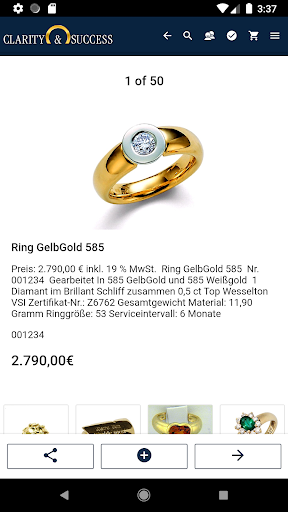
Jewellers have the ability to sell on the app, scan labels, print receipts, send receipts by mail, sign privacy statements directly on the display, or open the cash drawer. In addition, BERLIN turns out to be a perfect sales aid in that customer requests for price, brand or material are filtered with just a few clicks. Through a picture gallery, the results are displayed on the screen and the customer can then create a personal wish list. It is also possible to create new customers or view the sales history of existing customers.
With the new app BERLIN, selling and consulting becomes faster and better. The app can be easily integrated into the existing merchandise management system by communicating with the main computer via Wi-Fi or over the Internet. All data thus automatically transmits to the ERP system. The BERLIN app is suitable for Android smartphones and tablets from versions Android 6.0. BERLIN offers flexible and fast selling in the shop next to the stationary POS system. The app offers the familiar, easy-to-use features already available from CLARITY & SUCCESS jeweller management software. Stock items can be sold through the app. The use of pool items is not possible in the app. Repairs, vouchers, advance payments or redemptions should therefore be processed via the stationary POS.
After the app has been successfully connected via the web service, it synchronizes the new product images for the activated product areas with each start. The images are stored locally on the internal memory of the mobile device. The product pictures are not available in the normal picture gallery of the device. Should the device be lost, the app can be locked locally in the jeweller management software.
The connection between the terminal and the web service installed on a local PC in the respective shop is first of all protected by the encryption of the WiFi or the structurally given security of the LAN network connection.
If you want to work over the internet, you need the installation and the purchase of an SSL certificate. (We are happy to assist you in choosing this certificate). The cost of such a certificate is borne by the jeweller himself.