Graphics Driver Preferences
com.cast4tv.graphics.driver.preferences
View detailed information for Graphics Driver Preferences — ratings, download counts, screenshots, pricing and developer details. See integrated SDKs and related technical data.

Screenshots


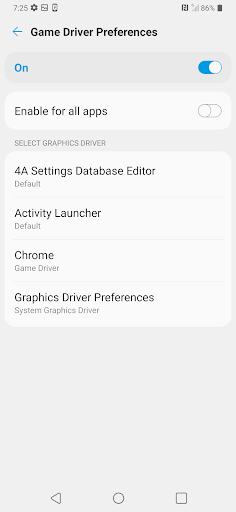

Description
* What is graphic driver preferences?
Game Driver Preferences allows developers to use custom graphics drivers targeting specific apps. The drivers need to be installed locally and developers have the option of switching between them at will. Some say enabling one of this options will force Vulkan which offers better and more stable performance.
* What is the purpose of game driver?
One of the coolest feature of Android 10 is the Game Driver preference that will let your phone run games using it's native GPU hardware APIs even if it was built for a more powerful set of graphics instructions, The game driver further improves your game performance based on your hardware.
* What is the Graphics Driver Preferences app?
It can help you to enable developer options and modify graphics driver settings.
* How to use it?
1. Tap "Driver Settings" to enable developer options.
2. Tap "Driver Settings" again to modify graphics driver settings.
3. With "System Graphics Driver" you can get good battery lifetime, With "Game Driver" you can get good performance.