국한문 성경:한자사전+개역한글+오프라인
com.box.bible
View detailed information for 국한문 성경:한자사전+개역한글+오프라인 — ratings, download counts, screenshots, pricing and developer details. See integrated SDKs and related technical data.
- No items.

Screenshots

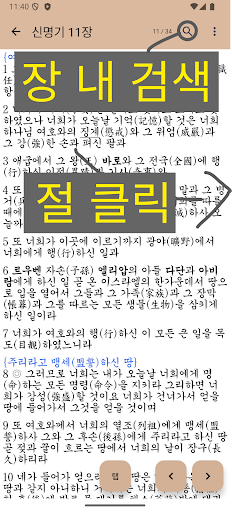


Description
I hope it helps you learn the Word.
If you look at 'Photo' in the Play Store and know how to use it,
You can use it conveniently.
//// By 23/6/19
Note) The Hangul version of this app is the same as the Korean version, with Chinese characters inserted between them.
The difference from the Korean version of the Bible, which is a paper Bible, is in Korean, but there are minor typos in Korean because the revised Korean version came out a little earlier. Perhaps those who read the Korean version of the Bible may feel typos while reading the Bible.
So even if there is a typo in the Korean language of this app, it is difficult to see it as an error because the paper is the same as the Bible. And I don't think there's anything that interferes with understanding the Bible at all. (The fight (fight) in Zechariah 10:5 may be a bit confusing...)
They often send me errors like this by e-mail. I replied for the same reason as above, but I will change it if I have time and space and think it's right to change it.
///////////////////////
One)
-Continue reading function
The last 2] bookmarked place of each chapter of the New Testament and Old Testament is saved
If there is only one place in the New Testament or Old Testament, go to that chapter.
If both are present, the selection window is displayed.
2)
-bookmark
Press and hold a section of any chapter to open the window
(like copy, share function)
Updates directly to the last selected location
3)
- Chinese character dictionary
If you touch any verse with Chinese characters once, the dictionary window will open.
4)
-setting
Settings can be made in the menu bar for viewing the Bible (with a dot, dot, dot on the far right)
- font size
-Button location (left, right change)
-View in Chinese or Korean or (Chinese + Korean)
-with/without line spaces
-Night/normal mode
5)
-search
Press the search button on the menu bar with the Bible contents
Search (Cannot search Chinese characters)
6)
-Highlight function (like a highlighter)
Just drag and drop the verse you want to save
Search results and main highlight screen
Click on a passage to go to that chapter
(If there are any mistakes, please let me know!)