Bookmark Server
com.bookmarkserver
View detailed information for Bookmark Server — ratings, download counts, screenshots, pricing and developer details. See integrated SDKs and related technical data.
Screenshots

Description
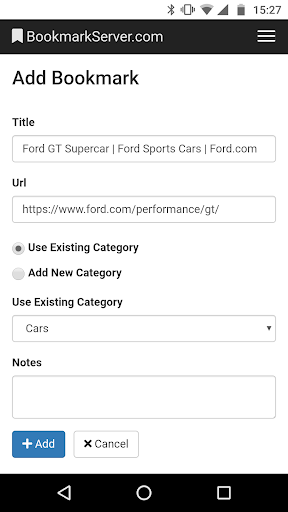
This app is the Add Bookmark button for BookmarkServer.com.
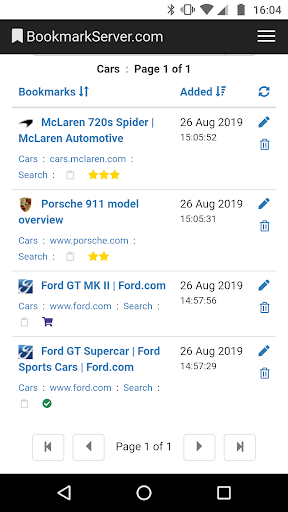
With BookmarkServer.com you always have access to your bookmarks. Whether you are at home or at work, using Android, iPhone, PC or Mac. It's easy to add new bookmarks and use them on all your devices.
• Works great with Android, iPhone, Windows, Mac, and Linux.
• Includes an easy to use Add Bookmark button for every web browser.
• Use categories to keep everything organised.
• Edit, move, and delete bookmarks and categories.
• List, sort, and search your bookmarks.
• Private and secure. No adverts.
To find out more please visit: BookmarkServer.com
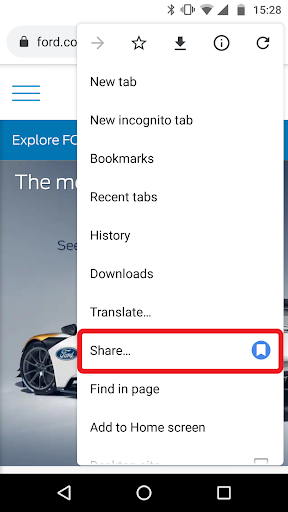
How to bookmark a web page on your Android device:
1. Open the Google Chrome app and navigate to a page you would like to bookmark.
2. Tap the menu button in the upper right corner (three vertical dots), scroll down and tap on Share...
3. Tap on the BookmarkServer icon.
How to bookmark a web page on other devices:
Please visit: BookmarkServer.com/Home/AddButton