Word Search: Word Puzzle Games
com.avirise.wordsearch
View detailed information for Word Search: Word Puzzle Games — ratings, download counts, screenshots, pricing and developer details. See integrated SDKs and related technical data.
Screenshots


Description
Word Search has long been considered a useful exercise for training brains and expanding vocabulary. Therefore, we have collected thousands of words in our word connect game, so that you could make words from letters without getting bored or tired! So, let's find out why this is one of the best puzzle games for adults and what is special about it!
Main functionality of Seek and find word game free
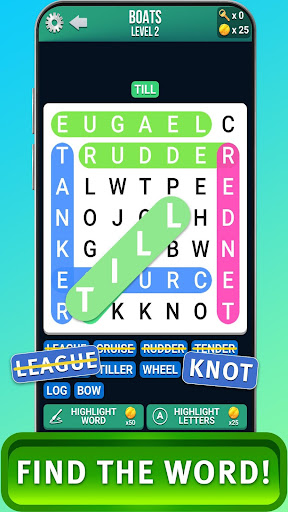
Word find is a unique puzzle game in which you have to connect colored plates with letters to form words. Hundreds of challenging levels (from the easiest to the most difficult) and thousands of words are waiting to make you brain-strain. If you go through several levels daily, you will noticeably increase your vocabulary and develop logical thinking.
Words in the game are dedicated to various topics, there are also thematic levels, for example, dedicated to nature, animals, etc. With such a variety of topics, the game will captivate both children and adults. Gradually increasing the complexity of words on new levels will help you keep your brain in good shape and enjoy difficult word search.
The most important thing is that you do not have to worry about the Internet connection for comfortable and successful wordsearch because you can connect words offline without losing progress. Also, in the process of passing the levels, you are not limited in time and there are no penalties for mistakes.
How to use the game?
You do not have to spend a lot of effort to install and enjoy the game. Follow the next steps:
1. Download and install the game on your smartphone from the Play Market.
2. Open the game menu to proceed to the first level.
3. To make words from letters, just swipe in the following directions: horizontally, vertically, and diagonally. But you need to remember: the chain of letters must not be interrupted to form a word!
4. When you find and connect all the words, you go to the next level with more difficult and interesting words!