우진플라임 Speed Club(KOREA)
com.asapp.cust
View detailed information for 우진플라임 Speed Club(KOREA) — ratings, download counts, screenshots, pricing and developer details. See integrated SDKs and related technical data.

Screenshots


Description
• Install the Woojin Fly SpeedClub application.
Woojin Fly Speed Club has never experienced customers before
We offer a variety of convenient services.
Anytime, anywhere A / S reception, expert consultation, real-time progress check,
Experience innovative features such as service history lookup.
ㆍ We accept A / S of Woojin Ply injection machine and check the progress of each step in real time.
It consists of menus such as A / S reception, reception status, progress status, and result details.
You can see a report on processing in your app.
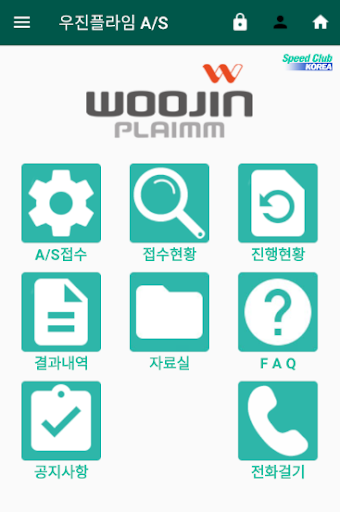
■ home screen
ㆍ It is a screen consisting of A / S reception, reception status, progress status, result details, notice, and phone call.
You can go to the screen you want to use the service.
■ Login screen
ㆍ This is a screen to manage membership registration, login, ID and password.
You can register and log in. If you forgot your ID or password, you can find them.
■ Member Information Screen
ㆍ This is a screen for registering and modifying member, business, account and contact information.
You can manage and change your membership information.
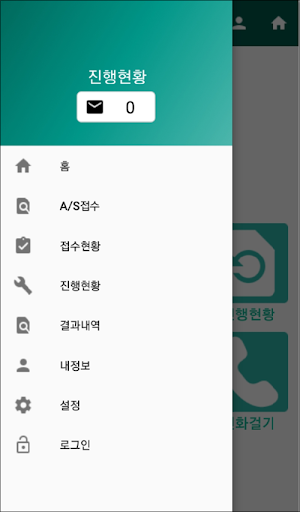
■ Menu Screen
ㆍ Check the entire menu of the app and select the button to switch the screen.
View push notifications, announcements, terms and conditions, privacy policies, and more.
■ A / S reception screen
ㆍ This is a screen for A / S reception when there is a problem with the product held by the customer.
A / S required Product selection, symptom input, detailed symptom input, photo registration can be quickly received.
■ Reception Status Screen
ㆍ A / S received history can be checked along with the contents, and the contents of the contents can be revised and canceled.
■ Progress Screen
ㆍ It is a screen to check the progress of A / S application details in real time.
Checking the status value of completion of reception → completion of assignment → dispatching → processing → after-sales service in real time
Function. In addition, depending on the status value situation, a notification can be generated and confirmed.
■ Result screen
ㆍ This is the screen to check the service result report after A / S processing is completed.
You can select the report of the application you want and check it.
You can ask.
[However, please contact Woojin Fly Speed Club for the report after 15 days. ]
■ Notice Screen
ㆍ This is a screen where you can check the announcements registered at Woojin Ply.
You can check the app's announcements such as information and changes.
■ Call screen
ㆍ If you have any questions, select the call button and the call connection screen will appear.
Woojin Fly Speedclub connection number is displayed.