Persian for AnySoftKeyboard
com.anysoftkeyboard.languagepack.persian
View detailed information for Persian for AnySoftKeyboard — ratings, download counts, screenshots, pricing and developer details. See integrated SDKs and related technical data.

Screenshots



Description
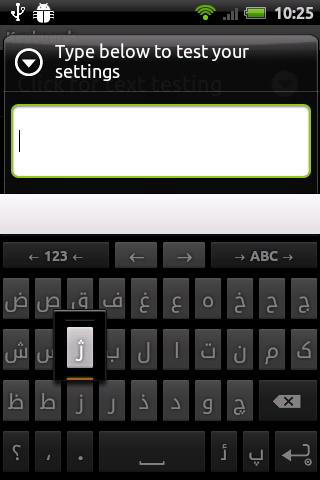
Persian (Farsi) and Pinglish (Finglish) keyboard layout for AnySoftKeyboard. READ BELOW!
Installation:
This is an expansion layout pack for AnySoftKeyboard (AnySoftKeyabord is an APP).
Step0. You need to have Persian/Arabic fonts before using this language pack otherwise it does not work. Follow http://j.mp/farsiandroid to install Persian language fonts on your device.
Step1. Find AnySoftKeyboard in the Android Market and Install it.
Step2. Install this Persian layout pack.
Step3. To activate: In Settings->Languages->tick AnySoftKeyboard
Step4. Select Persian layout from AnySoftKeyboard's Settings> Keyboards menu.
Step5. To set as default: Long press a text field, and select "Input method"
Notes:
Pinglish keyboard has similar layout to English keyboard layout, the only difference is the suggested wordlist. To see this layout when you are on Persian layout, simply tap on ' > ABC >'. For example if you have enabled English and Persian and Persian (Pinglish) layouts the order going to be English (tap > ABC >) Persian (tap > ABC >) Persian (Pinglish) (tap > ABC >) English ...
Important Notes:
1. You need Persian/Arabic font to see letters.
3. This App is NOT suppose to work on ALL DEVICES (just tested on Android 2.2 - CM6). this is a problem with ANDROID that doesn't fully support Arabic/Persian languages. Please contact me on my email/website if you have problem regarding to this app. I CANNOT reply to the comments.
4. Tap and hold some letters to see alternative letters.
5. If you have access to better wordlist for Persian and Pinglish please feel free to contact me. The current lists are still beta.
6. This is open source application. Feel free to contribute on https://github.com/pi3ch/persian_anysoftkeyboard
7. Send me your issues on github not Google play comments (only if you want them to be fixed).
Features:
* Persian word suggestions
* Persian numbers
* Persian special characters
* Persian YE (tap and hold on YE)
* Pinglish keyboard and dictionary
* ...