Expense Plus: Tracker But FAST
com.alkanakisu.expensePlus
View detailed information for Expense Plus: Tracker But FAST — ratings, download counts, screenshots, pricing and developer details. See integrated SDKs and related technical data.
- No items.

Screenshots

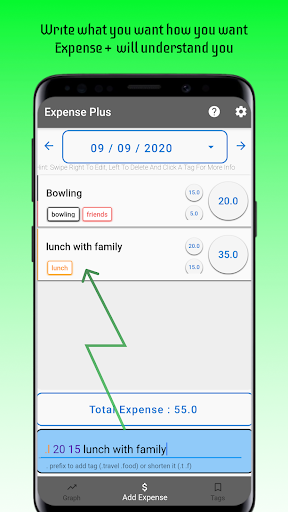


Description
👀 Vision
Most of the expense trackers want you to click and type a lot of things. However, with the help of Expense Plus, you only need to click the text field and type much less.
⚡️ Features
Expense Plus has 4 main feature:
1. Add Expense
You can add and see your expenses in here
2. Tags
You can add and see your tags here. Also, you can give a short name to a tag so you do not need to type the whole name
3. Graph
You can see your expense amounts daily, weekly, and monthly based on the tags
4. Limit
You can configure daily, weekly and monthly limits and get feedback if you exceed the limit
❓ How To Use
Adding expenses can be tricky but not that difficult.
🔖 How To Add Tags
You just need to add . or # before the tag's name. For example, .travel #food
Also, you can give a short name (e.g. initial letter) to a tag in the Tags page so you do not need to type the whole name. For example, you can write .f instead of .food
💵 How To Add Amount
Numbers that do not have a prefix will be counts as the amount. Expenses can have multiple amounts and amounts can be decimal.
For Example, if you write .travel 12.5 9 ==> will be count as an Expense that has two amounts 12.5 and 9. Total 21.5. (and it has a travel tag)
📝 How To Give A Name
Words that do not have a prefix will be counts as the name of the expense.
For Example, if you write bus .travel 12.5 9 ==> will be count as an Expense called bus (tags = travel, amounts = 12.5 and 9)