ZENEC SP-REM
com.acr.sprem
View detailed information for ZENEC SP-REM — ratings, download counts, screenshots, pricing and developer details. See integrated SDKs and related technical data.

Screenshots


Description
The ZENEC Smartphone Remote Control APP allows you to conveniently control the ZENEC Head Unit's media sources from your smartphone.
Key Features:
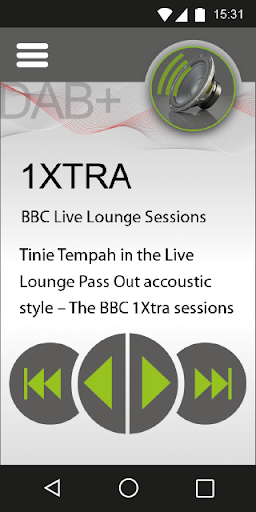
1. Operating the respective media sources, depending on the source you can switch to the next/previous track or pause playback, change the radio station or switch to the next ensemble in DAB.
2. Display of media information, depending on the respective media source, the ID3 information, station name or frequency and RDS text are displayed. For file-based sources such as USB or CD, the progress and the current running time are displayed.
3. Changing media sources, available are: DAB, FM, USB (audio and video), A2DP (BT music), Disc (CD / DVD audio and video) and iPod
4. Changing the volume using a button or rotary control with display of the current volume.
5. Switch off the head unit. This feature is particularly useful when used in a motorhome, as you can easily switch off from the comfort of your bed, regardless of the position of the sleeping area.
Please note:
o The ZENEC Smartphone Remote Control APP was developed specifically for use with a smartphone and does not work in combination with a tablet.
o The ZENEC Smartphone Remote Control APP requires at least Android 4.2.2.
o Currently supported models are:
ZENEC Z-E3756 (from software version V1.4.4), Z-N956 (from software version 1.1.6),
Z-E3766, Z-N966, Z-N965, Z-N875, Z-E3776, Z-N976 and Z-N975
o The connection is via BT; the smartphone must be paired with the head unit once.
If the smartphone is in the device list, the remote control automatically connects to the head unit when Bluetooth is switched on.
If the head unit is switched off directly and not via the APP, the Smartphone Remote Control APP must be closed manually for the next connection.