Calculator
cc.inc.calculator
View detailed information for Calculator — ratings, download counts, screenshots, pricing and developer details. See integrated SDKs and related technical data.

Screenshots


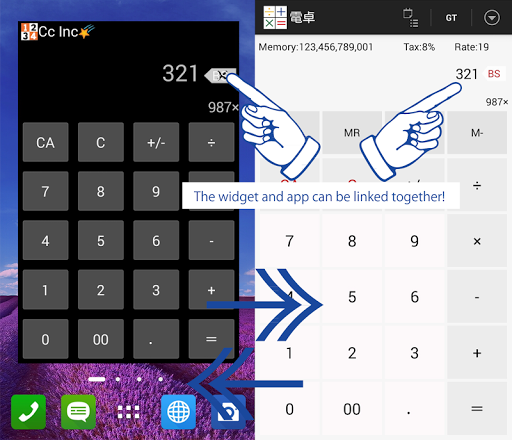
Description
"Calculator" is not than just a calculator, but a completely new sensational calculator for the Android.
It can be used daily for shopping, business, and even for calculating the national budget. We promise precise results.
- Comes with History display which shows Total (can be used to total receipts and estimates).
- After using, immediately send data as email (no need to re-enter again in PC).
- After entering operator, the number display is cleared (it is easy to understand where you are in your entry).
- Accurate calculation function (calculation method design that stands up even in the financial industry)
- Useful in daily situations thanks to the combination of TAX buttons, RATE buttons, and MEMORY feature buttons.
- When displaying vertically, you can switch among TAX, RATE, and MEMORY by swiping horizontally.
- Electronic Calculator widget linked to all calculation processes is provided. (Unlike other widgets, it is not used when the Electronic Calculator is used, saving energy.)
=============================
Example Use: Shopping / Business estimations
Setting
R:S(Setting rates) → 1
T:S (Settings taxes)→ 8
Case 1:(How to use buttons to avoid having to type in x 1)
Enter → 500
Push "*R" button.
Calculation Results → 500×1= 500
Case 2:(How to calculate and obtain results including tax)
Enter→ 500
Push "*T" button.
Calculation Results → 500×1.08= 540
Case 3:(Price x Number of items x tax rate)
Enter→ 500
Push "2" button.
Push "*T" button.
Calculation Results → 500×2×1.08= 1,080
=============================
Example Use: International Shopping and Exchange Rate Calculation
Setting
R:S(Setting rates) → 20
T:S (Settings taxes)→ 13
Case 1:(Price x Exchange rate)
Enter → 500
Push "*R" button.
Calculation Results → 500×20= 10,000
Case 2:(Price x Tax ÷ Exchange rate)
Enter → 500
Push "*T" button.
Push "/R" button.
Calculation Results → 500×1.13÷20= 28.25
Case 3:(Price × Exchange rate x Tax)
Enter → 10000
Push "/R" button.
Push "*T" button.
Calculation Results → 1000×20×1.13= 22600
=============================
This app earns revenue through ads.
(C) 2015 Cc Inc