Weather Personal Widget
ca.ludg.android.weatherwidget
View detailed information for Weather Personal Widget — ratings, download counts, screenshots, pricing and developer details. See integrated SDKs and related technical data.
Screenshots


Description
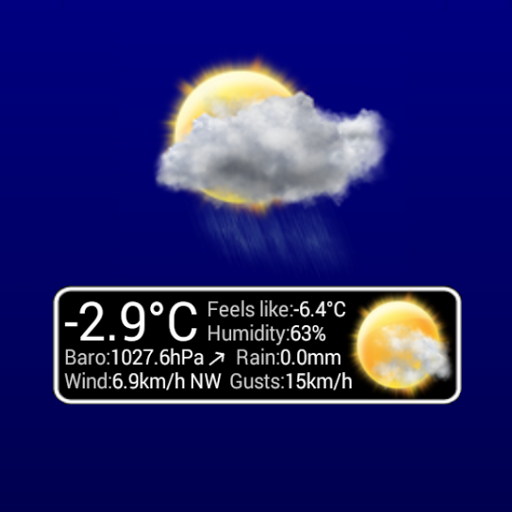
This widget displays the information of a clientraw.txt file generated by the software Weather Display.
This is NOT an application. This is a widget. You need to add it to your home screen after install.
To use it, your need a personal weather station and a program like Weather Display to generate the file clientraw.txt and upload it to a web server.
In the configurations, the URL must me a fully qualified url: https://www.server.com/live/clientraw.txt
It supports http and https protocols.
Click the temperature in the upper left corner to configure, click anywhere else to update the display.
Configurable:
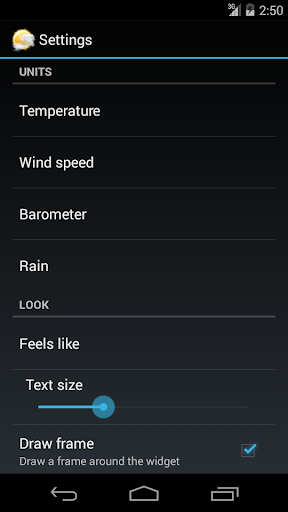
-Temperature units (Celsius or Fahrenheit)
-Wind speed units (kts, m/s, km/h, mph)
-Barometer(hPa, in/hg)
-Rain (mm, in)
-Feels like: Apparent, humidex, windchill, heat index.
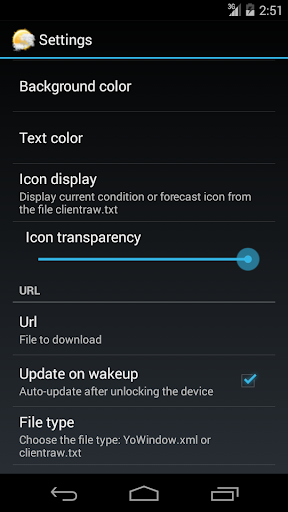
-Background/Text color and transparency
-Text size
-Display of an icon for the forecast/current conditions
-Icon transparency
-Auto-update when the device is unlocked
-Periodic update
-URL of the file to download
-file type: clientraw.txt or yowindow.xml.
The small chart behind the temperature is the temperature in the last hour. The limits of the graphic are the hi/lo temperature of the day.
You can activate a periodic update. It will download only when the screen is ON.
To discuss about this widget, you can go to the Weather-Watch forum: https://www.weather-watch.com/smf/index.php?topic=54688.0