AppLock: Password Locker
app.lock.applocker.password
View detailed information for AppLock: Password Locker — ratings, download counts, screenshots, pricing and developer details. See integrated SDKs and related technical data.
Total installs
730.6K(730,679)
Rating
4.2(21 reviews)
Released
September 14, 2021
Last updated
May 10, 2024
Category
Tools
Developer
CODYNIX LTD
Developer details
Name
CODYNIX LTD
E-mail
support@codynix.xyz
Website
unknown
Country
unknown
Address
unknown

Screenshots


Description
AppLock will help to lock apps and ensure complete security of them with pattern or password. Lock your social networks such as Instagram, Facebook, messengers, Gallery, Contacts with Applock - your privacy guard, and be sure your personal data is safe 🔐
App Lock
🔴 Functionality
Free app locker has a number of useful features:
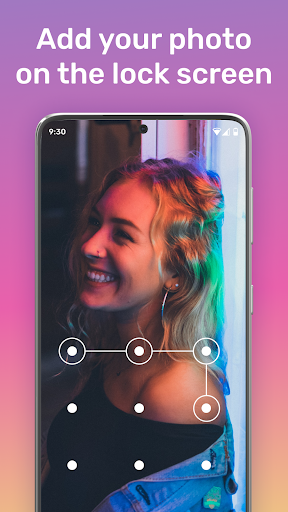
📌 Personalization. Choose your favorite theme from the many available. Also, as a background, you can load an image from your gallery.
📌 You can use a pattern or password lock.
📌 Spy camera. If someone tries to access blocked applications, Apps lock takes an intruder's selfie with the front camera and saves the picture in the device's gallery.
App Locker
🟢 Advantages
✅ Convenience and quickness of use. Applock has an intuitive interface that allows you to easily and quickly lock any application.
✅ High level of security. Protect all personal information on your device with Apps lock. It allows you to lock app with a password or pattern.
✅ System applications lock. Besides self-installed applications on the device (Skype, Instagram, Facebook, Whats App), you can also protect system applications. Now Gallery, Settings, Contacts, SMS, incoming calls are under reliable protection. You can block unwanted incoming calls and add a contact to the blacklist.
✅ Photos and videos lock. The security app helps to hide private photos and videos - it moves them to special secret storage from the gallery.
Lock Apps
🔵 How to use the app?
To start using Applock, you need to follow a few simple steps:
1️⃣ Launch the applocker.
2️⃣ Install the pattern. Immediately after starting the application, you can draw a pattern. To confirm, you will need to re-draw the desired pattern.
3️⃣ Confirm the application conditions. You need to click "Accept Policy" to start working with the application.
Applocker
🟠 How to set a lock for application?
🔸 Select the desired application to lock
🔸 Click the "Lock" button
🔸 Click the "Back" button
🔸 When on the home screen, find a locked app
🔸 Enter the application and make sure the locking is active.
With App Lock free you can secure your phone and hiding confidential information is now easier than you think.