KOREATECH
app.koreatech.ac.kr.smartkoreatech
View detailed information for KOREATECH — ratings, download counts, screenshots, pricing and developer details. See integrated SDKs and related technical data.

Screenshots


Description
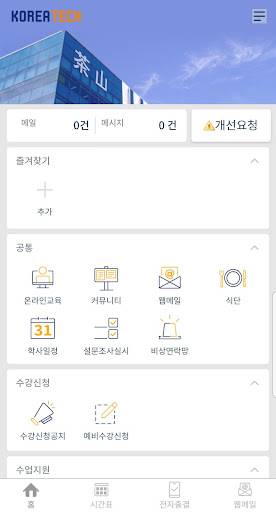
The KOREATECH app is a Korea Institute of Technology and Education application created for the convenient school life of faculty, staff and students.
▷ KOREATECH main functions
- Webmail: Use Aunuri mail system function
- Online education: Access and use the online education website
- Community: Check the general, scholarship, academic, student life, bulletin board, and civil service bulletin boards on campus.
- Diet: Check the breakfast/lunch/dinner menu of the school cafeteria
- Emergency contact network: Ability to send a text message to the person in charge of the dormitory on campus
- Academic calendar: Check the school’s academic calendar
- Class support: class schedule, grade inquiry, use of NCS checklist function
- Electronic attendance: Use mobile electronic attendance function using Bluetooth
- Student services: Student information inquiry, anonymous bulletin board (Bamboo Forest), use of work history writing function
[Access rights]
‘Required access rights’ require permission when using the function.
If not permitted, normal use of the service may be restricted.
- Bluetooth, location information: Used for electronic attendance tracking.
(To use electronic attendance, both nearby devices and location must be allowed in the app permissions)
- NFC: Used for building entry and attendance management.
- Storage: Used to store mail and online education files.
[Change permissions]
How to change access permissions (Applies to Android 6.0 and above)
Change in Settings > Application Management > KOREATECH > Permissions
(Some menu names may vary depending on the manufacturer)