What do I eat today
apace.cosamangiooggi
View detailed information for What do I eat today — ratings, download counts, screenshots, pricing and developer details. See integrated SDKs and related technical data.

Screenshots



Description
Cosa mangio oggi ("What do I eat today") is the answer to the same question that creeps into the minds of thousands of people every day.
Did you ever find yourself face to face with the refrigerator, full of expectations even though you didn't have the slightest idea what to prepare to eat? If you have experienced that distinct sense of dissatisfaction due to the disorientation in front of the remaining ingredients, this is the application for you!
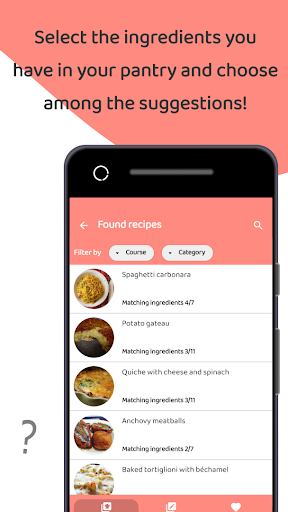
Cosa mangio oggi offers you the opportunity of counting on a valid assistant always ready to give you a choice in the kitchen. The suggested dishes will be the result of the possible combinations of what is present in the pantry: just insert in the "Find recipes" section the ingredients that are available at a given time.
Within the application there is a collection of fanciful ideas for everyone, filterable by name and/or type of desired course. The recipe book will be accessible even if there isn't an active Internet connection.
Furthermore, to adhere as much as possible to the culinary tastes of each, it was decided to customize the user experience with the option to allow adding, modifying and deleting new recipes. In this way, the search by ingredients will show solutions tailored to your own eating habits.
Lastly, those who prefer to play in advance will certainly find the "Meal Plan" function advantageously practical: by indicating your preferences among the reference categories (fish, meat, eggs, cheese, vegetables and cereals) and selecting the unwanted ingredients in the designated blacklist, a weekly meal plan will be elaborated immediately, which could be modified at any time.
Here the project of starting from the ingredients can be tracked down in the choice of considering the categories to which the ingredients belong to define the category to which the recipe belongs; this means that a recipe will belong to more categories if it has ingredients of different origin. In this sense, the blacklist is essential: only by excluding all the ingredients of a specific type (e.g. of animal origin) you will have a meal plan that does not contain recipes with ingredients of that type.